#SVGo: A Go library for SVG generation#
The library generates SVG as defined by the Scalable Vector Graphics 1.1 Specification ().
Output goes to the specified io.Writer, operation occur with Go's float64 type.
## Supported SVG elements and functions ##
### Shapes, lines, text
circle, ellipse, polygon, polyline, rect (including roundrects), line, text
### Paths
general, arc, cubic and quadratic bezier paths,
### Image and Gradients
image, linearGradient, radialGradient,
### Transforms ###
translate, rotate, scale, skewX, skewY
### Animation ###
animate, animateMotion, animateTranslate, animateRotate, animateScale, animateSkewX, animateSkewY
### Filter Effects
filter, feBlend, feColorMatrix, feColorMatrix, feComponentTransfer, feComposite, feConvolveMatrix, feDiffuseLighting,
feDisplacementMap, feDistantLight, feFlood, feGaussianBlur, feImage, feMerge, feMorphology, feOffset, fePointLight,
feSpecularLighting, feSpotLight,feTile, feTurbulence
### Metadata elements ###
desc, defs, g (style, transform, id), marker, mask, pattern, title, (a)ddress, link, script, use
## Building and Usage ##
See svgdef.[svg|png|pdf] for a graphical view of the function calls
Usage: (assuming GOPATH is set)
go get github.com/ajstarks/svgo/float
You can use godoc to browse the documentation from the command line:
$ go doc github.com/ajstarks/svgo/float
a minimal program, to generate SVG to standard output.
package main
import (
"github.com/ajstarks/svgo/float"
"os"
)
func main() {
width := 500.0
height := 500.0
canvas := svg.New(os.Stdout)
canvas.Start(width, height)
canvas.Circle(width/2, height/2, 100)
canvas.Text(width/2, height/2, "Hello, SVG", "text-anchor:middle;font-size:30px;fill:white")
canvas.End()
}
Drawing in a web server: (http://localhost:2003/circle)
package main
import (
"log"
"github.com/ajstarks/svgo/float"
"net/http"
)
func main() {
http.Handle("/circle", http.HandlerFunc(circle))
err := http.ListenAndServe(":2003", nil)
if err != nil {
log.Fatal("ListenAndServe:", err)
}
}
func circle(w http.ResponseWriter, req *http.Request) {
w.Header().Set("Content-Type", "image/svg+xml")
s := svg.New(w)
s.Start(500, 500)
s.Circle(250, 250, 125, "fill:none;stroke:black")
s.End()
}
You may view the SVG output with a browser that supports SVG (tested on Chrome, Opera, Firefox and Safari), or any other SVG user-agent such as Batik Squiggle.
### Graphics Sketching with SVGo and svgplay ###
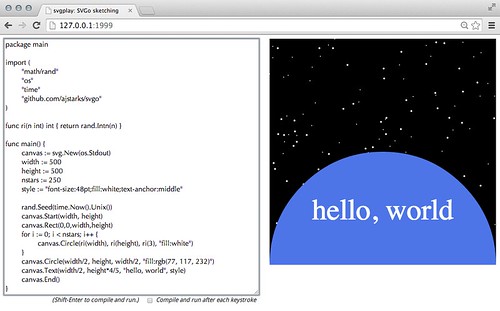
Combined with the svgplay command, SVGo can be used to "sketch" with code in a browser.
To use svgplay and SVGo, first go to a directory with your code, and run:
$ svgplay -f # use the floating point version
2014/06/25 22:05:28 ☠ ☠ ☠ Warning: this server allows a client connecting to 127.0.0.1:1999 to execute code on this computer ☠ ☠ ☠
Next open your browser to the svgplay server you just started.
svgplay only listens on localhost, and uses port 1999 (guess which year SVG was first introduced) by default
http://localhost:1999/
Enter your code in the textarea, and when you are ready to run press Shift--Enter. The code will be compiled, with the results
on the right. To update, change the code and repeat. Note that compilation errors are shown in red under the code. In order for svgplay/SVGo to work, make sure that the io.Writer specified with the New function is os.Stdout.
If you want to sketch with an existing file, enter its URL:
http://localhost:1999/foo.go
### SVGo Papers and presentations ###
* SVGo paper from SVGOpen 2011
* Programming Pictures with SVGo
* SVGo Workshop
* The Other Side of Go: Programming Pictures
## Functions and types ##
Many functions use x, y to specify an object's location, and w, h to specify the object's width and height.
Where applicable, a final optional argument specifies the style to be applied to the object.
The style strings follow the SVG standard; name:value pairs delimited by semicolons, or a
series of name="value" pairs. For example: `"fill:none; opacity:0.3"` or `fill="none" opacity="0.3"` (see: )
The SVG type:
type SVG struct {
Writer io.Writer
Decimals int
}
Most operations are methods on this type, specifying the destination io.Writer and decimal precision.
The Offcolor type:
type Offcolor struct {
Offset uint8
Color string
Opacity float64
}
is used to specify the offset, color, and opacity of stop colors in linear and radial gradients
The Filterspec type:
type Filterspec struct {
In string
In2 string
Result string
}
is used to specify inputs and results for filter effects
### Structure, Scripting, Metadata, Transformation and Links ###
New(w io.Writer) *SVG
Constructor, Specify the output destination, and the number of digits after the decimal point (default 2)
Start(w float64, h float64, attributes ...string)
begin the SVG document with the width w and height h. Optionally add additional elements
(such as additional namespaces or scripting events)
Startview(w, h, minx, miny, vw, vh float64)
begin the SVG document with the width w, height h, with a viewBox at minx, miny, vw, vh.
Startunit(w float64, h float64, unit string, ns ...string)
begin the SVG document, with width and height in the specified units. Optionally add additional elements
(such as additional namespaces or scripting events)
Startpercent(w float64, h float64, ns ...string)
begin the SVG document, with width and height in percent. Optionally add additional elements
(such as additional namespaces or scripting events)
StartviewUnit(w, h float64, unit string, minx, miny, vw, vh float64)
begin the SVG document with the width w, height h, in the specified unit, with a viewBox at minx, miny, vw, vh.
End()
end the SVG document
Script(scriptype string, data ...string)
Script defines a script with a specified type, (for example "application/javascript").
if the first variadic argument is a link, use only the link reference.
Otherwise, treat variadic arguments as the text of the script (marked up as CDATA).
if no data is specified, simply close the script element.
Style(scriptype string, data ...string)
Style defines a script with a specified type, (for example "text/css").
if the first variadic argument is a link, use only the link reference.
Otherwise, treat variadic arguments as the text of the script (marked up as CDATA).
if no data is specified, simply close the style element.
Group(s ...string)
begin a group, with arbitrary attributes
Gstyle(s string)
begin a group, with the specified style.
Gid(s string)
begin a group, with the specified id.
Gtransform(s string)
begin a group, with the specified transform, end with Gend().
Translate(x, y float64)
begins coordinate translation to (x,y), end with Gend().
Scale(n float64)
scales the coordinate system by n, end with Gend().
ScaleXY(x, y float64)
scales the coordinate system by x, y. End with Gend().
SkewX(a float64)
SkewX skews the x coordinate system by angle a, end with Gend().
SkewY(a float64)
SkewY skews the y coordinate system by angle a, end with Gend().
SkewXY(ax, ay float64)
SkewXY skews x and y coordinate systems by ax, ay respectively, end with Gend().
Rotate(r float64)
rotates the coordinate system by r degrees, end with Gend().
TranslateRotate(x, y float64, r float64)
translates the coordinate system to (x,y), then rotates to r degrees, end with Gend().
RotateTranslate(x, y float64, r float64)
rotates the coordinate system r degrees, then translates to (x,y), end with Gend().
Gend()
end the group (must be paired with Gstyle, Gtransform, Gid).
ClipPath(s ...string)
Begin a ClipPath
ClipEnd()
End a ClipPath
Def()
begin a definition block.
DefEnd()
end a definition block.
Marker(id string, x, y, w, h float64, s ...string)
define a marker
MarkerEnd()
end a marker
Mask(id string, x float64, y float64, w float64, h float64, s ...string)
creates a mask with a specified id, dimension, and optional style.
MaskEnd()
ends the Mask element.
Pattern(id string, x, y, width, height float64, putype string, s ...string)
define a Pattern with the specified dimensions, the putype can be either "user" or "obj", which sets the patternUnits
attribute to be either userSpaceOnUse or objectBoundingBox.
Desc(s string)
specify the text of the description.
Title(s string)
specify the text of the title.
Link(href string, title string)
begin a link named "href", with the specified title.
LinkEnd()
end the link.
Use(x float64, y float64, link string, s ...string)
place the object referenced at link at the location x, y.
### Shapes ###
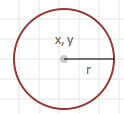
Circle(x float64, y float64, r float64, s ...string)
draw a circle, centered at x,y with radius r.
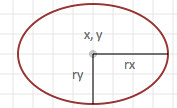
Ellipse(x float64, y float64, w float64, h float64, s ...string)
draw an ellipse, centered at x,y with radii w, and h.
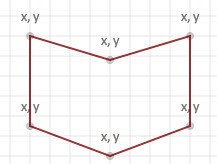
Polygon(x []int, y []int, s ...string)
draw a series of line segments using an array of x, y coordinates.
Rect(x float64, y float64, w float64, h float64, s ...string)
draw a rectangle with upper left-hand corner at x,y, with width w, and height h.
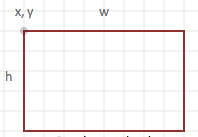
CenterRect(x float64, y float64, w float64, h float64, s ...string)
draw a rectangle with its center at x,y, with width w, and height h.
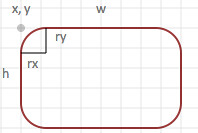
Roundrect(x float64, y float64, w float64, h float64, rx float64, ry float64, s ...string)
draw a rounded rectangle with upper the left-hand corner at x,y,
with width w, and height h. The radii for the rounded portion
is specified by rx (width), and ry (height).
Square(x float64, y float64, s float64, style ...string)
draw a square with upper left corner at x,y with sides of length s.

### Paths ###
Path(p string, s ...style)
draw the arbitrary path as specified in p, according to the style specified in s.
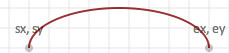
Arc(sx float64, sy float64, ax float64, ay float64, r float64, large bool, sweep bool, ex float64, ey float64, s ...string)
draw an elliptical arc beginning coordinate at sx,sy, ending coordinate at ex, ey
width and height of the arc are specified by ax, ay, the x axis rotation is r
if sweep is true, then the arc will be drawn in a "positive-angle" direction (clockwise),
if false, the arc is drawn counterclockwise.
if large is true, the arc sweep angle is greater than or equal to 180 degrees,
otherwise the arc sweep is less than 180 degrees.
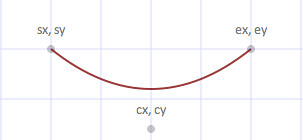
Bezier(sx float64, sy float64, cx float64, cy float64, px float64, py float64, ex float64, ey float64, s ...string)
draw a cubic bezier curve, beginning at sx,sy, ending at ex,ey
with control points at cx,cy and px,py.

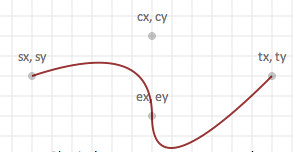
Qbezier(sx float64, sy float64, cx float64, cy float64, ex float64, ey float64, tx float64, ty float64, s ...string)
draw a quadratic bezier curve, beginning at sx, sy, ending at tx,ty
with control points are at cx,cy, ex,ey.
Qbez(sx float64, sy float64, cx float64, cy float64, ex float64, ey float64, s...string)
draws a quadratic bezier curver, with optional style beginning at sx,sy, ending at ex, sy
with the control point at cx, cy.
### Lines ###
Line(x1 float64, y1 float64, x2 float64, y2 float64, s ...string)
draw a line segment between x1,y1 and x2,y2.

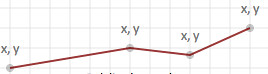
Polyline(x []int, y []int, s ...string)
draw a polygon using coordinates specified in x,y arrays.
### Image and Text ###
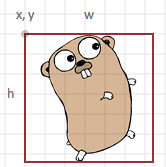
Image(x float64, y float64, w float64, h float64, link string, s ...string)
place at x,y (upper left hand corner), the image with width w, and height h, referenced at link.
Text(x float64, y float64, t string, s ...string)
Place the specified text, t at x,y according to the style specified in s.
Textspan(x float64, y float64, t string, s ...string)
Place specified text, t at x,y according to the optional style specified in s.
Use this method with Span(...). End with TextEnd()
Span(t string, s ...string)
Create a text span t, using optional style s
TextEnd()
End a text span
Textlines(x, y float64, s []string, size, spacing float64, fill, align string)
Places lines of text in s, starting at x,y, at the specified size, fill, and alignment, and spacing.
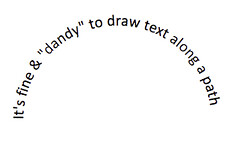
Textpath(t string, pathid string, s ...string)
places optionally styled text along a previously defined path.
### Color ###
RGB(r float64, g float64, b float64) string
creates a style string for the fill color designated
by the (r)ed, g(reen), (b)lue components.
RGBA(r float64, g float64, b float64, a float64) string
as above, but includes the color's opacity as a value
between 0.0 (fully transparent) and 1.0 (opaque).
### Gradients ###
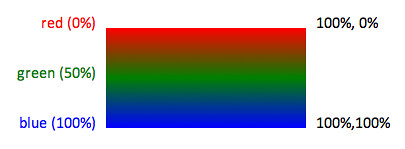
LinearGradient(id string, x1, y1, x2, y2 uint8, sc []Offcolor)
constructs a linear color gradient identified by id,
along the vector defined by (x1,y1), and (x2,y2).
The stop color sequence defined in sc. Coordinates are expressed as percentages.
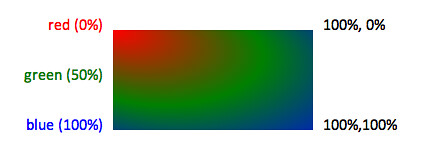
RadialGradient(id string, cx, cy, r, fx, fy uint8, sc []Offcolor)
constructs a radial color gradient identified by id,
centered at (cx,cy), with a radius of r.
(fx, fy) define the location of the focal point of the light source.
The stop color sequence defined in sc.
Coordinates are expressed as percentages.
### Animation ###
Animate(link, attr string, from, to float64, duration float64, repeat float64, s ...string)
Animate animates the item referenced by the link, using the specified attribute
The animation starts at coordinate from, terminates at to, and repeats as specified.
Addtional attributes may be added as needed.
AnimateMotion(link, path string, duration float64, repeat float64, s ...string)
AnimateMotion animates the referenced object ```link``` along the specified ```path```
AnimateTranslate(link string, fx, fy, tx, ty float64, duration float64, repeat float64, s ...string)
AnimateTranslate animates the translation transformation (link refers to the object to animate, fx, fy are from coordinates, tx, ty are the to coordinates)
AnimateRotate(link string, fs, fc, fe, ts, tc, te float64, duration float64, repeat float64, s ...string)
AnimateRotate animates the rotation transformation (link refers to the object to animate, f[s,c,e] are the from start, center, and end angles, t[s,c,e] are the
start, center, and end angles)
AnimateScale(link string, from, to, duration float64, repeat float64, s ...string)
AnimateScale animates the scale transformation (link refers to the object to animate, from and to specify the scaling factor)
AnimateSkewX(link string, from, to, duration float64, repeat float64, s ...string)
AnimateSkewX animates the skewX transformation ((link refers to the object to animate, from and to specify the skew angle)
AnimateSkewY(link string, from, to, duration float64, repeat float64, s ...string)
AnimateSkewY animates the skewY transformation (link refers to the object to animate, and from and to specify the skew angle)
### Filter Effects ###
Filter(id string, s ...string)
Filter begins a filter set
Standard reference:
Fend()
Fend ends a filter set
Standard reference:
FeBlend(fs Filterspec, mode string, s ...string)
FeBlend specifies a Blend filter primitive
Standard reference:
FeColorMatrix(fs Filterspec, values [20]float64, s ...string)
FeColorMatrix specifies a color matrix filter primitive, with matrix values
Standard reference:
FeColorMatrixHue(fs Filterspec, value float64, s ...string)
FeColorMatrix specifies a color matrix filter primitive, with hue values
Standard reference:
FeColorMatrixSaturate(fs Filterspec, value float64, s ...string)
FeColorMatrix specifies a color matrix filter primitive, with saturation values
Standard reference:
FeColorMatrixLuminence(fs Filterspec, s ...string)
FeColorMatrix specifies a color matrix filter primitive, with luminence values
Standard reference:
FeComponentTransfer()
FeComponentTransfer begins a feComponent filter Element>
Standard reference:
FeCompEnd()
FeCompEnd ends a feComponent filter Element>
FeComposite(fs Filterspec, operator string, k1, k2, k3, k4 float64, s ...string)
FeComposite specifies a feComposite filter primitive
Standard reference:
FeConvolveMatrix(fs Filterspec, matrix [9]int, s ...string)
FeConvolveMatrix specifies a feConvolveMatrix filter primitive
Standard referencd:
FeDiffuseLighting(fs Filterspec, scale, constant float64, s ...string)
FeDiffuseLighting specifies a diffuse lighting filter primitive,
a container for light source Element>s, end with DiffuseEnd()
FeDiffEnd()
FeDiffuseEnd ends a diffuse lighting filter primitive container
Standard reference:
FeDisplacementMap(fs Filterspec, scale float64, xchannel, ychannel string, s ...string)
FeDisplacementMap specifies a feDisplacementMap filter primitive
Standard reference:
FeDistantLight(fs Filterspec, azimuth, elevation float64, s ...string)
FeDistantLight specifies a feDistantLight filter primitive
Standard reference:
FeFlood(fs Filterspec, color string, opacity float64, s ...string)
FeFlood specifies a flood filter primitive
Standard reference:
FeFuncLinear(channel string, slope, intercept float64)
FeFuncLinear is the linear form of feFunc
Standard reference:
FeFuncGamma(channel, amplitude, exponent, offset float64)
FeFuncGamma is the gamma curve form of feFunc
Standard reference:
FeFuncTable(channel string, tv []float64)
FeFuncGamma is the form of feFunc using a table of values
Standard reference:
FeFuncDiscrete(channel string, tv []float64)
FeFuncGamma is the form of feFunc using discrete values
Standard reference:
FeGaussianBlur(fs Filterspec, stdx, stdy float64, s ...string)
FeGaussianBlur specifies a Gaussian Blur filter primitive
Standard reference:
FeImage(href string, result string, s ...string)
FeImage specifies a feImage filter primitive
Standard reference:
FeMerge(nodes []string, s ...string)
FeMerge specifies a feMerge filter primitive, containing feMerge Element>s
Standard reference:
FeMorphology(fs Filterspec, operator string, xradius, yradius float64, s ...string)
FeMorphologyLight specifies a feMorphologyLight filter primitive
Standard reference:
FeOffset(fs Filterspec, dx, dy float64, s ...string)
FeOffset specifies the feOffset filter primitive
Standard reference:
FePointLight(x, y, z float64, s ...string)
FePointLight specifies a fePpointLight filter primitive
Standard reference:
FeSpecularLighting(fs Filterspec, scale, constant float64, exponent float64, color string, s ...string)
FeSpecularLighting specifies a specular lighting filter primitive,
a container for light source elements, end with SpecularEnd()
FeSpecEnd()
FeSpecularEnd ends a specular lighting filter primitive container
Standard reference:
FeSpotLight(fs Filterspec, x, y, z, px, py, pz float64, s ...string)
FeSpotLight specifies a feSpotLight filter primitive
Standard reference:
FeTile(fs Filterspec, in string, s ...string)
FeTile specifies the tile utility filter primitive
Standard reference:
FeTurbulence(fs Filterspec, ftype string, bfx, bfy float64, octaves float64, seed int64, stitch bool, s ...string)
FeTurbulence specifies a turbulence filter primitive
Standard reference:
### Filter convenience functions (modeled on CSS filter effects) ###
Blur(p float64)
Blur function by standard deviation
Brightness(p float64)
Brightness function (0-100)
Grayscale()
Apply a grayscale filter to the image
HueRotate(a float64)
Rotate Hues (0-360 degrees)
Invert()
Invert the image's colors
Saturate(p float64)
Percent saturation, 0 is grayscale
Sepia()
Apply sepia tone
### Utility ###
Grid(x float64, y float64, w float64, h float64, n float64, s ...string)
draws a grid of straight lines starting at x,y, with a width w, and height h, and a size of n.
### Credits ###
Thanks to Jonathan Wright for the io.Writer update.